

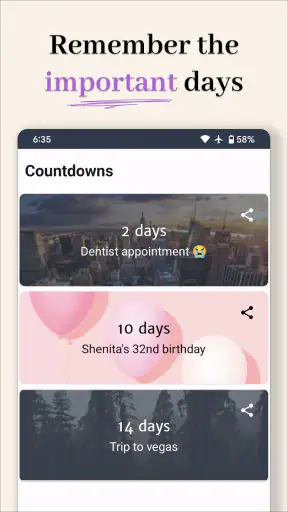

I like countdown apps because they solve a small but surprisingly useful problem: they turn a date that feels vague into something I can see every day. Countdown - Days Until takes that idea and keeps it focused on events, birthdays, holidays, and other moments I do not want to lose track of. After spending time with it, I found it most useful as a visual reminder rather than a full calendar replacement. It gives upcoming dates a clear place on my phone, with widgets and reminders doing most of the practical work.
This is a free lifestyle app from Days Until LTD, rated for Everyone and available on Android devices running version 8.0 or later. Its current version is 3.0.960, and it has passed the one-million-install mark with a 4.7 average from around seventeen thousand ratings. Those figures suggest that the simple countdown format has broad appeal, but popularity alone does not make every countdown tool a good fit. The important question is whether you want a dedicated visual prompt or just another list inside a calendar.
How Countdown - Days Until fits into everyday planning
A clearer way to keep personal dates visible
The app works best when I use it for dates that matter emotionally or personally. A birthday, a family visit, a concert, a holiday, a trip, or the end of a project can all feel more immediate when the remaining time is shown as a countdown. A normal calendar tells me when something happens; this app puts the distance from today at the center of the experience.
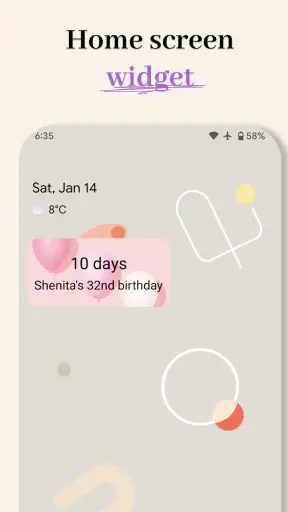
That difference is small, but it changes how I interact with the information. I do not need to open a monthly calendar and search for a date. I can glance at a widget and immediately see which event is approaching. For long-term plans, that visual treatment is especially helpful. “In several weeks” is easy to forget, while a changing number on the home screen keeps the event present without requiring a separate planning session.
I would not treat it as a replacement for a calendar, task manager, or complete reminder system. It is better at answering one question: how long until this particular moment? If I need meeting times, recurring work appointments, shared schedules, location details, or complex notifications, a conventional calendar remains the stronger tool. Countdown - Days Until complements those apps rather than taking over their jobs.
Widgets are the main reason to keep it installed
The most useful part of the experience is the widget approach. A countdown hidden inside an app is easy to ignore, but a widget turns it into a passive reminder. I can place an important event where I naturally look during the day, which makes the app feel less like a database and more like a small piece of visual planning.
There is a practical trade-off here. Showing too many events at once can make the information less meaningful. I get better results when I reserve the most visible space for one or two dates that genuinely deserve attention. For example, keeping a family birthday and an upcoming trip on the home screen is more effective than filling it with every minor deadline. The app encourages this kind of prioritization because its value depends on quick recognition.
A useful setup is to separate emotional events from obligations. I might use one prominent countdown for a holiday or visit, while keeping less important dates inside the app instead of displaying them constantly. That prevents the widget from becoming background noise. It is a simple habit, but it makes the difference between a reminder I notice and one I mentally filter out.
Creating events without overcomplicating them
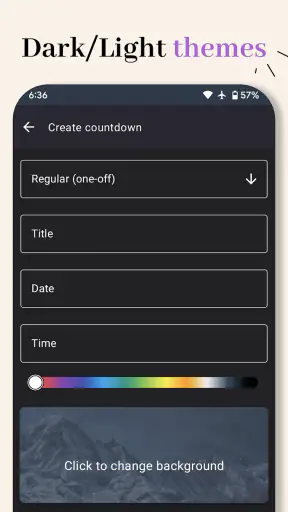
Adding an event is straightforward in concept: choose what I am waiting for, assign its date, and let the app calculate the remaining time. That simplicity is one of its strengths. I do not have to build a project, add several fields, or organize a complicated calendar before I can see a result.
The same simplicity can become a limitation for users who want detailed planning. A countdown is not the same thing as a schedule. If an event needs preparation steps, multiple participants, travel information, or a sequence of reminders, I would create the full plan elsewhere and use this app only for the headline date. It is most effective when the event can be understood in one glance.
For recurring personal occasions, I recommend checking the date carefully when setting them up. Birthdays and annual holidays are easy to think of as permanent, but the useful countdown depends on the correct next occurrence. A quick review at setup avoids the frustrating situation of watching a countdown aimed at the wrong year or an outdated occasion.
Reminders add a practical layer
The app is not only about watching numbers change. Smart reminders make it more useful for events that need action before the final day. A trip may require packing, a birthday may require buying a gift, and a holiday may involve arranging time off. The countdown keeps the target visible, while a reminder can help prevent the last-minute rush.
I find this combination more useful when I choose reminder timing based on the event rather than accepting one routine for everything. A birthday gift might need a prompt several days ahead, while a personal milestone may only need a reminder on the day. The best result comes from treating the countdown as the long-range view and the reminder as the moment when I need to do something.
There is also a psychological benefit. A countdown can create excitement, but it can also create pressure if every deadline is displayed aggressively. I would avoid using it for every work task or minor obligation. For those, a task app with priorities and completion states is usually better. This tool is strongest when the date itself is the important information.
What the current version says about the app’s direction
The current release is version 3.0.960, which places the app in a mature stage rather than an early experiment. The product has been available since July 9, 2018, and the large install base shows that the basic concept has remained useful over time. I see the current state as an effort to keep a focused utility polished instead of expanding it into an overloaded planning suite.
That matters for existing users. People who already rely on countdown widgets are likely to appreciate continuity more than a dramatic redesign. A tool like this becomes part of a phone’s routine, so predictable behavior is valuable. At the same time, a version in the 3.0 series creates reasonable expectations that the experience has moved beyond a bare date calculator and now pays attention to presentation, reminders, and day-to-day convenience.
I would be careful not to interpret the version number as a promise of a particular feature roadmap. What I can judge today is the app’s current role: it is a dedicated way to keep selected dates visible, with customization and reminders making the basic calculation more personal. Future improvements would be welcome, but the present experience should be evaluated on that focused purpose.
How it compares with calendars and simpler alternatives
Compared with Google Calendar, Apple Calendar, or another full calendar, Countdown - Days Until is less comprehensive but more immediate. A calendar is better for appointments, invitations, repeating schedules, and time-specific commitments. This app is better when I want one event to stay visually prominent without navigating through a crowded agenda.
Compared with a basic notes app, it has a clear advantage: the remaining time updates automatically. A note saying “holiday in December” becomes stale, while a countdown keeps changing. Compared with a task manager, however, it does not offer the same sense of progress. A task manager tells me what to do next; a countdown tells me how close the date is. Choosing between them depends on whether the date or the action is the main concern.
There is also a difference from built-in phone reminders. Those reminders are often better for one-time alerts, while a dedicated countdown can keep the event visible for weeks or months. I would use both when necessary: a widget for awareness and a standard reminder for a specific action. That two-layer workflow avoids expecting one small app to handle every part of planning.
Three useful workflows beyond the obvious countdown
My first recommended workflow is a “single-focus” home screen. I choose the one event I most want to feel connected to, place its widget in a visible position, and keep the rest of my dates inside the app. This works well for a vacation, a wedding, a move, or a personal goal. The benefit is not more information; it is better attention. One meaningful countdown is harder to ignore than a wall of dates.
The second is a preparation buffer. Instead of thinking only about the final date, I use the countdown to decide when preparation should begin. If the event is important, I create an earlier mental checkpoint and use a reminder for it. This turns a passive number into a lightweight planning system without pretending the app is a full project manager.
The third is a shared-conversation aid. When family or friends ask how soon a visit, celebration, or holiday is coming, the countdown gives everyone a common reference point. It can make a long wait feel more concrete, especially for children or for events that are difficult to visualize on a standard calendar. I would still verify the actual date in a calendar when travel times or appointments are involved, but the countdown is better for the emotional side of waiting.
Where the experience may fall short
The focused design will not satisfy everyone. If I want detailed event notes, collaboration, location-based triggers, or a complete history of appointments, I would choose a calendar or event-planning app instead. Countdown - Days Until does not need to become all of those things, but users should understand the boundary before making it their only planning tool.
Widgets can also create clutter. Every additional countdown competes for attention, and a home screen full of dates quickly loses the calm simplicity that makes the app appealing. This is not a flaw in the calculation itself; it is a design trade-off that comes with visual reminders. I get the best results by being selective about what deserves permanent visibility.
The free entry point makes it easy to try, but in-app purchases range from $0.99 to $35.99 per item. That means I would inspect the available optional features before assuming every customization or convenience is included at no cost. The app remains free to start, yet the potential spending range is worth keeping in mind for anyone who wants a highly personalized setup.
Another consideration is platform fit. The minimum Android requirement is version 8.0, so users on older devices may need to check compatibility before planning around it. For supported phones, the Everyone age rating makes it suitable for a broad audience, including families looking for a simple way to count toward birthdays or holidays.
Who should use it, and who should skip it
I would recommend it to people who enjoy visual reminders, frequently forget personal dates, or want a more motivating way to look forward to an event. It is particularly good for birthdays, holidays, trips, anniversaries, graduations, and other occasions where the passage of time is part of the experience. It also suits users who find a traditional calendar too dense for personal milestones.
I would skip it as a primary tool if my day revolves around meetings, deadlines with multiple steps, shared work schedules, or detailed recurring appointments. In those situations, a calendar and task manager provide more useful structure. I would also avoid adding every small obligation here, because the app’s visual strength becomes less effective when everything is treated as equally important.
For a realistic everyday example, imagine that I have a family trip planned several weeks from now. I create the trip as the main countdown, put its widget on my home screen, and set a reminder for the point when I should begin preparing. I keep flight details and bookings in my calendar or travel app, but use this one for the simple question I ask most often: how long until we leave? That division of labor feels natural and avoids unnecessary duplication.
What I would watch as the app continues
For future updates, I would pay attention to how Days Until LTD balances customization with simplicity. The core idea does not need many extra layers, but small improvements to event organization, widget flexibility, and reminder control could make the app more useful without turning it into a calendar clone. Existing users should benefit most from changes that preserve quick access and reliable countdown behavior.
I would also watch how optional purchases affect the everyday experience. A free app can be excellent when its essential function remains comfortable without payment. If advanced presentation options are paid extras, that may be reasonable; if basic usability becomes restricted, the value becomes harder to judge. The current price range makes this an area worth considering before committing to a heavily customized setup.
My final view is positive, with a clear qualification: Countdown - Days Until is best as a focused companion, not an all-purpose organizer. It makes important dates visible, gives widgets a meaningful purpose, and adds reminders that can turn anticipation into preparation. I like it because it does one small job in a way that feels more personal than a standard calendar entry.
At the same time, I would keep expectations realistic. It will not replace a calendar, task manager, or travel planner, and too many countdowns can make the phone feel busier rather than more organized. For the right user, though, the simplicity is exactly the point. If you want birthdays, holidays, trips, and milestones to stay in view without digging through schedules, Countdown - Days Until is an easy free app to try, provided you are comfortable treating optional purchases as extras rather than assuming every enhancement is included.


